Showing posts with label Android. Show all posts

Thursday, December 5, 2019

Motorola One Hyper with 64MP camera, 45W fast Charging, Android 10 launched at $400

Motorola has launched its first smartphone with a pop-up selfie camera — Motorola One Hyper.
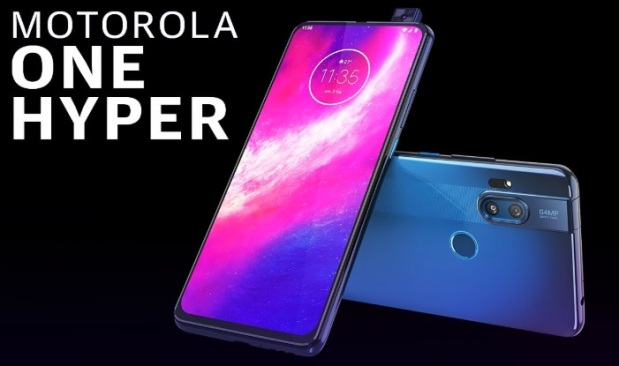
Motorola One Hyper

Latest News: Motorola’s much-hyped One Hyper has been announced which offers the company’s fastest charging system, the highest resolution cameras with Night Vision on both front & back and a pop-up mechanism to get rid of the notch.

Motorola One Hyper is also the first phone from the company to pack a 64-megapixel main camera and a full-screen display devoid of a notch or hole-punch. It is powered by the ageing octa-core Qualcomm Snapdragon 675 SoC and is protected by a layer of p2i nano-coating to keep liquid damage at bay.

Camera

  • The One Hyper comes with a dual-camera setup at the back, with the primary one being a 64-megapixel camera with F1.9 lens and the second one being an 8-megapixel 117-degree wide-angle camera with Quad Pixel tech. For selfies, the camera has a 32 MP camera on the front that also comes with a night vision mode for both pictures and videos.

Display

  • The Motorola One Hyper features a 6.5-inch LCD IPS screen with full HD+ resolution, 19:9 aspect ratio, and 85 percent screen-to-body ratio.

Battery

  • Fuelling the Motorola One Hyper is a 4,000 mAh battery and 45W Hyper Charging technology.

Colors

  • The smartphone is available in three color options — Deep sea blue, dark amber, and fresh orchid hues.

Price

  • The Motorola One Hyper has been announced at a price of $400 in the US. This roughly converts to Rs 29,000 as per today’s exchange rate.
For more details….

Tuesday, August 22, 2017

Android 8.0 Oreo: Here are the top features

Google rolls outs Android 8.0 Oreo: Here are the top features

 The next version of Google's mobile operating system 'Android Oreo' that has been rolled out in the US is packed with never-before-seen features and improvements in its various tools.

'Android Oreo' features a new picture-in-picture mode, new notification dots to the Operating System (OS) and improvements to Bluetooth audio playback, Google's Android website posted in a blog on Tuesday.

Recently-launched premium smartphones such as Samsung Galaxy S8, S8+ and HTC U11 are expected to see the software updates before the end of this year.

Around 85 per cent of Android devices used, according to the latest numbers, have not upgraded to Android Nougat that was released last year.

The new Android 8.0 OS was released in conjunction with the 2017 solar eclipse.

The update is currently undergoing carrier testing for Pixel phones and the Nexus 5X and 6P.

The new OS is expected to be two times faster than 'Nougat' and also helps minimise background activity in the apps that are used less.

'Android Oreo' lets a user see two apps at once and makes multitasking convenient.

For example, if you are watching a video on YouTube and have to respond to an email simultaneously, all you need to do is press the home button and that will shrink the video tab to a corner while you write a response.


Tuesday, June 27, 2017

6 easy ways to secure your mobile phone


From pickpockets to malware, your Android phone is under threat from all sides. Attackers are continually switching up their tactics in hopes of taking control of your device. Let's acknowledge that there's no foolproof way to protect your Android device from thieves and hackers.
Here are some ways you can protect yourself, your data, and your phone.
1. Keep Your Software Updated
  • An updated mobile operating system allows you to enjoy the latest and greatest features and while protecting your information.
2. Install an Antivirus App
  • As your mobile device functions more like a mini computer, it becomes a more attractive target for hackers or thieves. A reliable security app safeguards your data, protect against threats and locate your lost or stolen phone.
3. Lock Your Phone
  • when it comes to mobile phone security, but still half of Android users opt out of using a password, PIN, pattern, or fingerprint to secure their mobile devices. You may not think it matters much but believe me it does matter.
4. Locate and wipe your phone remotely
  • OK, so you locked your Android phone with a PIN or Smart Lock but you lost it anyway. Now what? Luckily, you can use the Android Device Manager to track your lost device and even wipe it if necessary, but only if you've enabled a pair of settings first.
5. Avoid Third-Party Apps (Unknown Sources)
  • If you do decide to use third-party apps, research to be sure you’re not getting a malicious one. Read reviews, and if the app asks for access to too much personal data up front, don’t download it.
6. Watch where you click
  • The mobile threats you’re most likely to face are scams and phishing attacks that will attempt to steal credit card information. Always check to see if a website starts with “https” before you enter sensitive information.
Note: Back up your phone data once in every 2 months.
There’s more you can do to secure your mobile phone. Which steps will you take to keep your information out of hackers’ hands?